Gait events
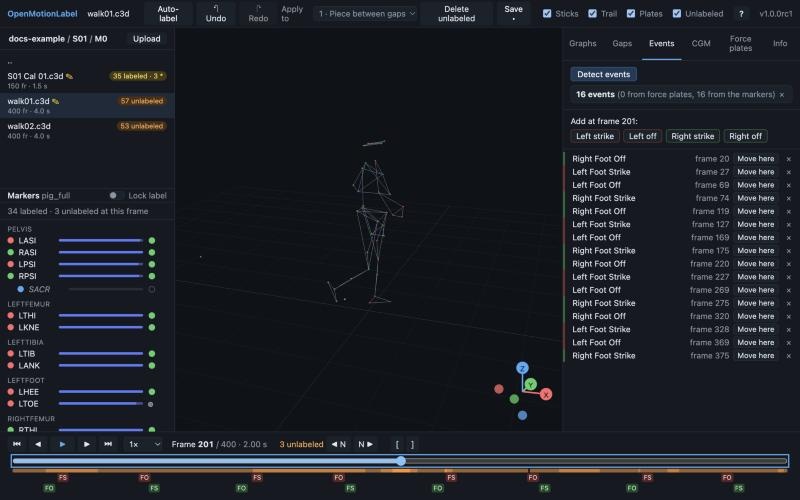
The timeline shows the trial's events as FS (foot strike) and FO (foot off), left above right. Click one to go to it, or drag it to move it. The Events tab lists them, adds one at the current frame and deletes one. Each change is one undo step. Saving writes the events into the C3D's EVENT group the way Nexus writes gait events.
Detecting events
Detect events finds the foot strikes and foot offs of a walking trial and replaces the ones in the trial; other events stay. It needs labeled heel, toe and pelvis markers.
- Force plates: a contact starts where the force rises above 20 N (adjustable) and ends where it falls below it. Its foot is the one standing over the plate. Only clean contacts give events: the heel landed on the plate, the toe left from it, and the other foot didn't stand on it too. The report says why any other contact was left out.
- Markers, for the other steps (after Zeni et al. 2008): the toe is furthest behind the pelvis at foot off. The heel reaches furthest forward just before the strike, and lands where it then stops coming down. The walking direction follows the pelvis, so turns and walking back are fine; on a treadmill it follows the swinging feet.
On public recordings (see Validation), force-plate events fell within one frame of the events in the files for 35 of 36 contacts, and marker events within three frames for 82%, two frames off on average. Events made elsewhere can differ by a few frames: an event set by eye, or found with another method, need not fall where the force rises.
From the command line
oml events walk01-filled.c3d --out walk01-events.c3d
oml eval-events /path/to/labeled/trials compares detected events with the ones already in the
files, and marker events with the force plates.