Gaps and filtering
The Gaps tab on the right lists the gaps of every labeled marker (tick "show filled" for the filled ones too). G and Shift+G jump to the next and previous open gap.
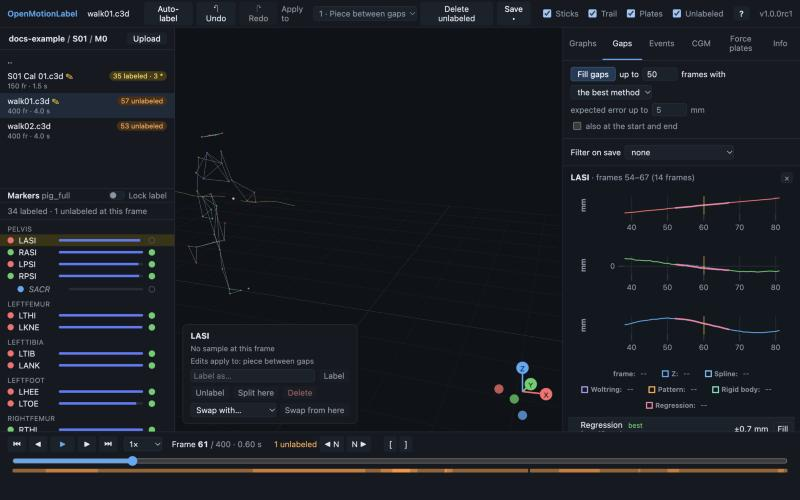
Filling one gap
Click a gap to see every way of filling it, drawn over its X, Y and Z curves, each with the error it is expected to have. Press Fill next to the one you want.
- Regression: predicted from the 10 nearest markers, with a model learned from the rest of the trial. A walking trial's repeated steps teach it well, and it handles long gaps best.
- Rigid body: moves with three or more markers of the same segment, or with two, following the line through them.
- Pattern: follows the marker that moved most like this one.
- Woltring (a quintic smoothing spline) and Spline (cubic): from the samples on both sides of the gap. They are best for short gaps.
Expected error: every method is also tried on stretches of the same length near the gap, where the marker was seen, and the error there is the estimate. "The best method" is the one with the smallest estimate.
Filling every gap
Fill gaps fills every open gap up to 50 frames (adjustable) the best way. Gaps whose fill is expected to be off by more than 5 mm stay open, and the report lists them. Gaps at the start or end of a trial can only be extrapolated; tick "also at the start and end" for those.
Fills and samples
- Each fill is one undo step and goes into the edit log with its positions, so
oml applyreproduces it. - A fill never replaces a sample: a point you label into a filled gap takes over.
- Filled frames show as see-through markers in the 3D view and as dashed lines in Graphs.
- In the saved file they have residual 0 and no camera, as the C3D standard asks.
Filtering
"Filter on save" filters the labeled markers when the trial is saved, with a zero-lag Butterworth low-pass or a smoothing spline (GCV). The Butterworth default is order 2 run forward and backward (the usual "4th-order zero-lag" filter) at 6 Hz. Each stretch between gaps is filtered on its own, so fill gaps first. The data you edit stay raw; "show the filtered curve in Graphs" draws the result.
From the command line
oml fill walk01-labeled.c3d --out walk01-filled.c3d --filter butterworth --cutoff 6
oml eval-fill /path/to/labeled/trials hides stretches of labeled markers (5 to 50 frames) and
compares every method's fill with what was there.