Uploads and remote access
Uploading trials
Upload (above the file list) sends C3D files to the data folder of oml serve, which can be
on another computer (see below). Give the subject and the session; static and walking trials go
side by side to
<data folder>/<subject>/<session>/
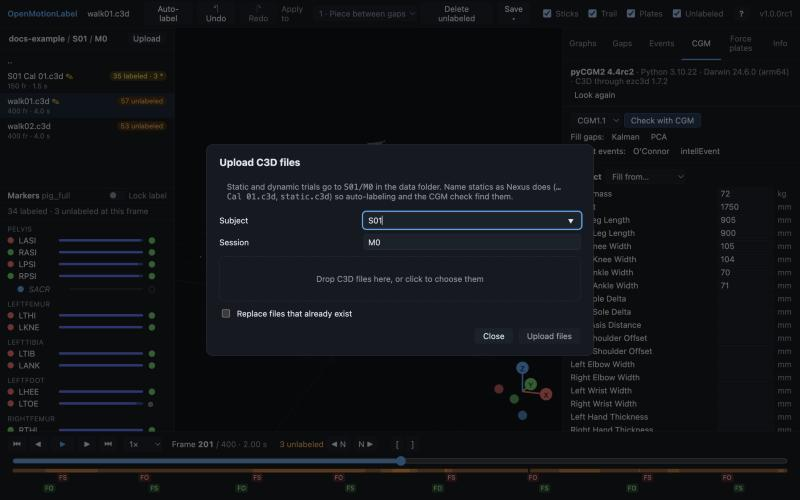
Auto-labeling and the CGM check find a session's static by its name, so name statics as Nexus
does (S01 Cal 01.c3d, static.c3d).
- Checked first: the server keeps a file only once it reads as a C3D file with data. It refuses names that could lead outside the data folder or wouldn't work on Windows.
- Replacing: an existing file is replaced only when "Replace files that already exist" is ticked, and never while it is open.
- Size: files can be up to 100 MB (
--max-upload-mb, or theserver.max_upload_mbsetting).
Remote access through a Cloudflare tunnel
oml serve only listens on 127.0.0.1, and it only answers requests addressed to localhost. A
Cloudflare Tunnel
makes it reachable from elsewhere without opening a port: cloudflared runs on the same
computer and forwards https://oml.example.org to http://localhost:8765.
-
Create the tunnel for a host name in a domain on your Cloudflare account:
cloudflared tunnel logincloudflared tunnel create omlcloudflared tunnel route dns oml oml.example.orgThen write its
config.yml:tunnel: oml credentials-file: /path/to/<tunnel id>.json ingress: - hostname: oml.example.org service: http://localhost:8765 - service: http_status:404 -
Start OpenMotionLabel with the tunnel's host name allowed, and a fixed token so the link survives restarts:
OML_TOKEN=<long random string> oml serve --root /path/to/data --no-browser --public-host oml.example.orgIt prints
https://oml.example.org/?token=…, the link to give your colleagues.- Make a token with
python -c "import secrets; print(secrets.token_urlsafe(32))". oml config set server.public_hosts oml.example.orgsaves you typing the host name.- Keep port 8765 free:
oml servemoves to another port when it is busy, and the tunnel would then lead nowhere.
- Make a token with
-
Run the tunnel:
cloudflared tunnel run oml
For a first try, cloudflared tunnel --url http://localhost:8765 gives a random
….trycloudflare.com address; pass that address to --public-host. Cloudflare means quick
tunnels for testing only.
Before using it with patient recordings
- Who can get in: anyone holding the link. Put Cloudflare Access in front of the host name, so colleagues log in with their e-mail address first. The token is then a second lock.
- Where the data go: Cloudflare decrypts HTTPS at its edge, so recordings cross its network in the clear on their way to the tunnel. Check with your data protection officer (GDPR) before uploading patient data this way, and use pseudonymised subject codes and file names.
- Limits: Cloudflare refuses requests over 100 MB, which is why that is the default upload limit. It ends requests that get no answer within 100 seconds (error 524): fast operations are fine, but a long pyCGM2 run, such as a CGM2.4 check of a long trial, may not be.