The interface
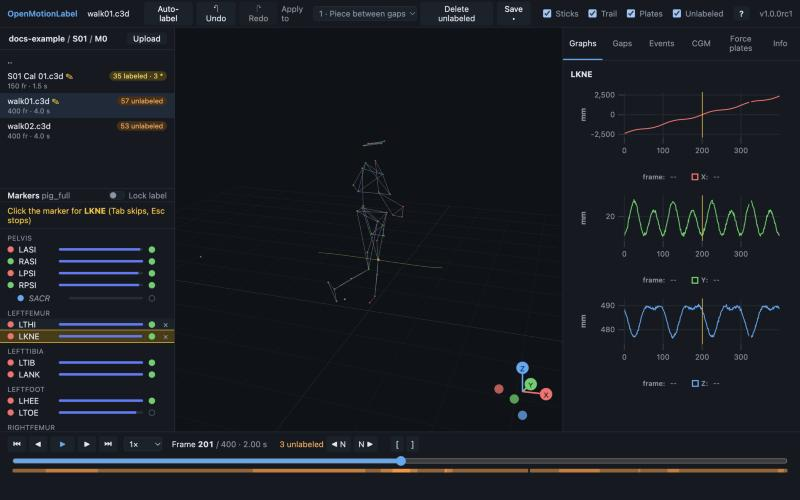
- Toolbar (top): Auto-label, undo and redo, Apply to (what a label or an edit covers),
Delete unlabeled, Save, and what the 3D view shows: sticks, marker trails, force plates and
unlabeled trajectories. The
?button lists every keyboard shortcut. - Files (left, top): the folder given to
oml serve --root, with the labeling status of each C3D file. Upload sends files to it (see Uploads and remote access). - Marker list (left, below): the marker set's labels by body segment, with a dot for each label present at the current frame, a "?" for uncertain ones, and the count of unlabeled trajectories.
- 3D view (centre): labeled markers coloured by side as in Nexus (left red, right green, centre blue), unlabeled ones grey, sticks between markers, and the force plates with their ground reaction force at the centre of pressure. Drag to rotate, right-drag or Shift-drag to pan, scroll to zoom.
- Tabs (right): Graphs (X, Y and Z of the selected marker, and the force plates), Gaps, Events, CGM, Force plates and Info (what the file holds).
- Timeline (bottom): play, step and the playback speed; the events, left above right; the marked frame range; N / Shift+N and the unlabeled count.
Keyboard shortcuts
| Keys | What they do |
|---|---|
| Space | Play / pause |
| ← → (Shift: ×10) | Previous / next frame |
| Home / End | First / last frame |
| Click a label, then a marker | Label it (moves on to the next missing marker) |
| L | Lock label: keep the armed label after each click |
| Tab | Skip to the next missing marker |
| Esc | Stop labeling / clear the range / clear the selection |
| 1 – 6 | Apply edits to: piece, trajectory, from here, up to here, range, this frame |
| [ ] | Mark the start / end of a frame range |
| U | Unlabel the selected marker |
| S | Split the selected trajectory at this frame |
| Delete | Delete the selected marker's samples |
| N / Shift+N | Next / previous start of an unlabeled piece |
| G / Shift+G | Next / previous open gap, in the Gaps tab |
| Ctrl/⌘ Z | Undo |
| Ctrl/⌘ Shift Z, Ctrl Y | Redo |
| Ctrl/⌘ S | Save |